Sports & Trading Card Collection App

Scan, organize, and check your sports card collection

The sports and trading card collection app for iPhone and iPad. Scan cards with your camera, auto-fill details with OCR, check if you already own a card, look up PSA & Beckett grades, and track values on eBay. Built for baseball, football, basketball, hockey, and soccer card collectors.

Download on the App Store Download on the App Store

iPhone & iPad · Free to try · No data collection · iCloud sync

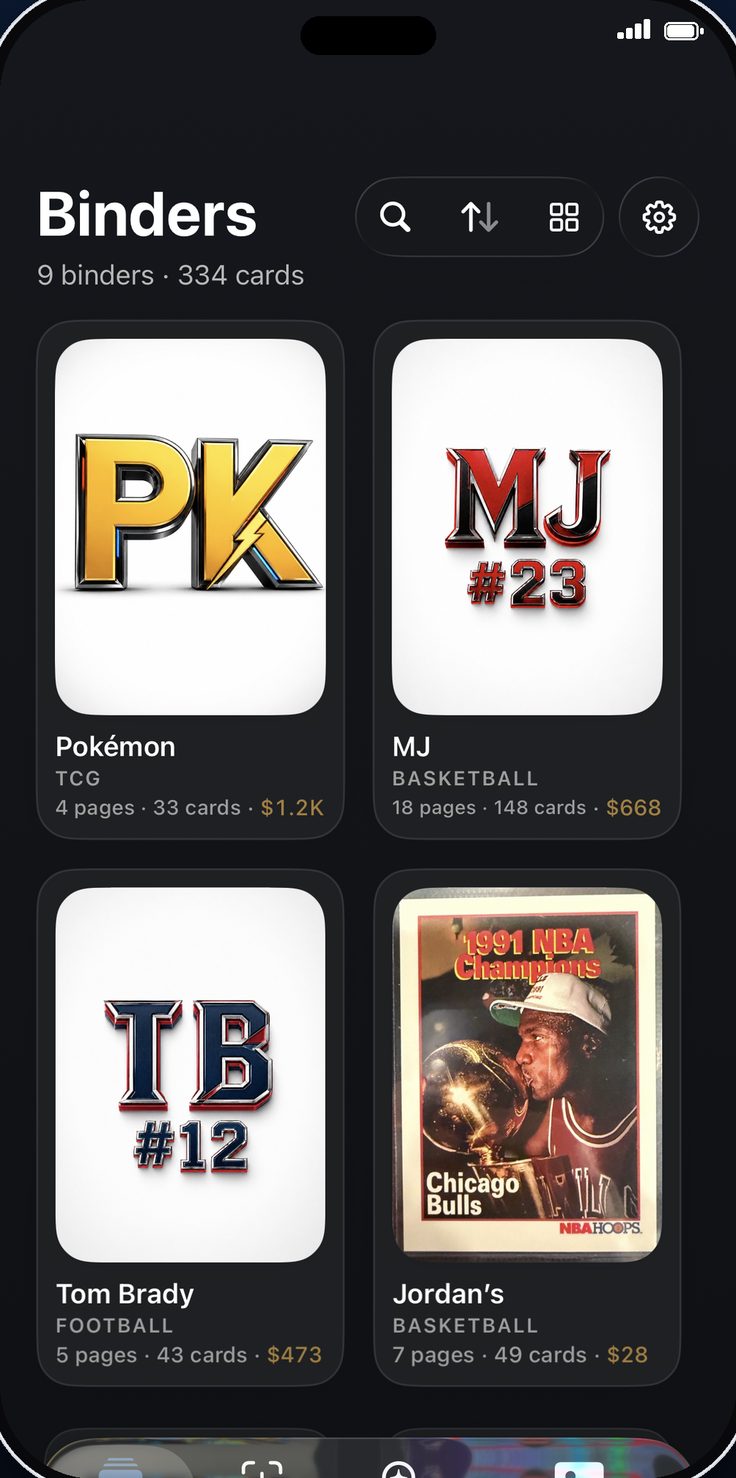
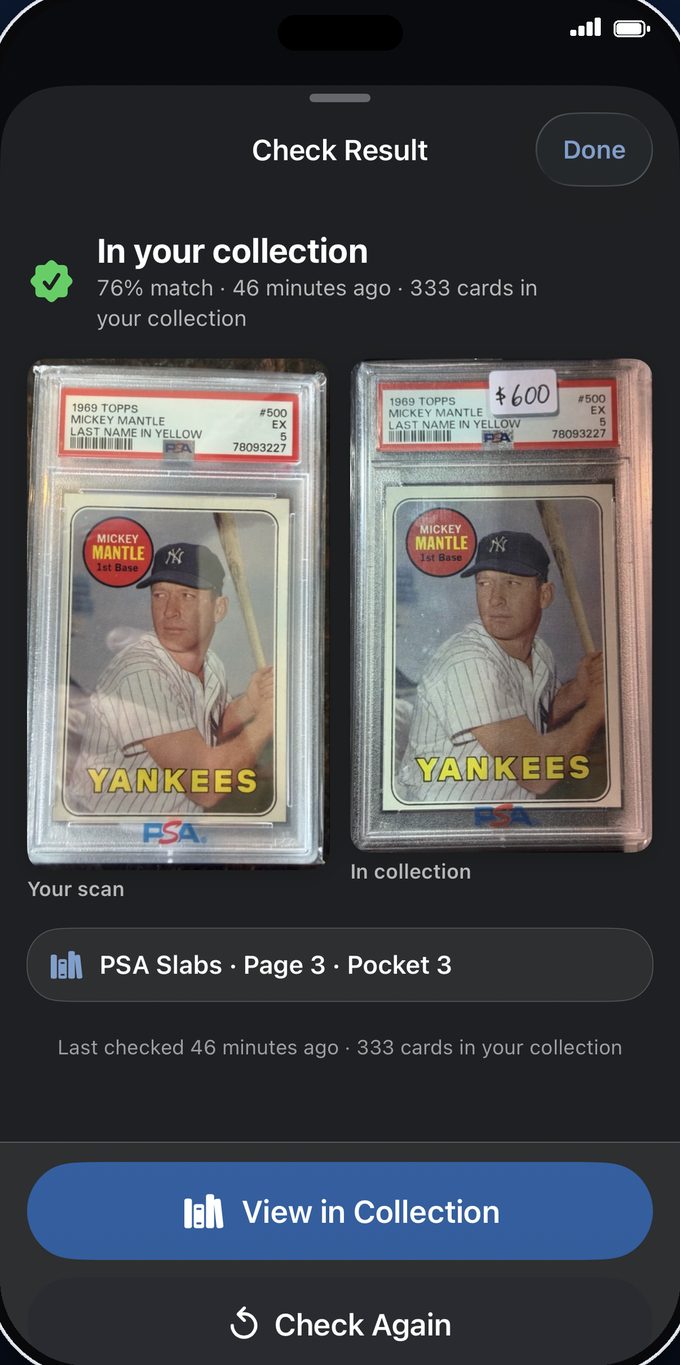
BinderIQ Library tab showing binder grid with card cover photos, page counts, and card counts BinderIQ Check Collection tab — snap a photo to see if you already own a card

Trading card scanner with collection tracking, PSA lookup, and price checks

Check if you own a card before buying it. Scan new pickups with ML-powered detection. Auto-fill details with OCR. Look up grades and eBay prices. Share binders with friends. Sync across all your devices.

Check Collection

At a card show? Snap a photo or import from your library to instantly check if you already own it. Visual fingerprinting matches against your entire collection in seconds. No more accidental doubles.
Smart Card Scanner

Point your camera at one or more cards. A custom ML model detects each one, auto-crops with perspective correction, and saves them into consecutive pockets. Distinguishes raw cards from graded slabs.

OCR Card Intelligence

Scan a card and BinderIQ reads both sides automatically. Extracts player name, year, set, manufacturer, card number, parallel, and serial number. Recognizes 25+ brands and 70+ sets.

eBay Card Lookup

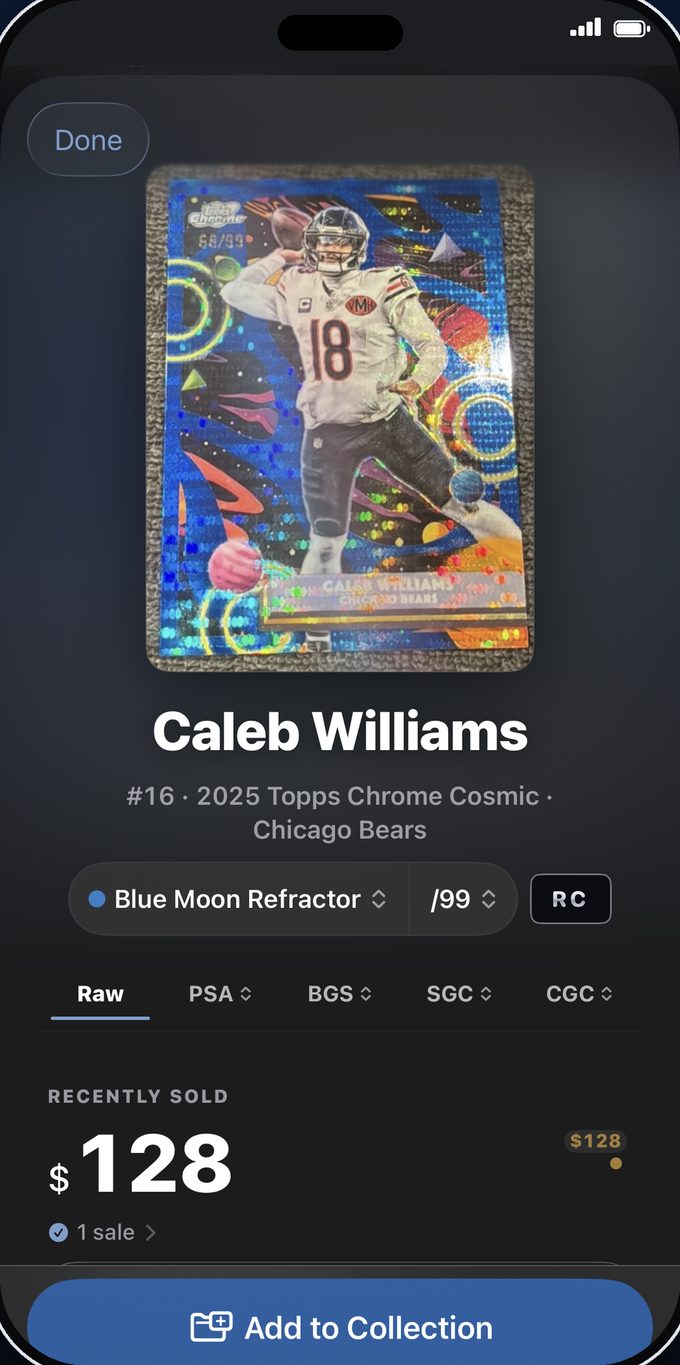
Snap a photo to find prices and listings on eBay. Or search by card details after a PSA/Beckett lookup. See live listings, sold comps, and direct links to know what your cards are worth.

PSA & Beckett Lookup

Look up grades by cert number — auto-scanned from graded slabs, no manual entry needed. Returns grade, population count, and sub-grades for BGS. Auto-populates your card details.

Binders, Pages & Pockets

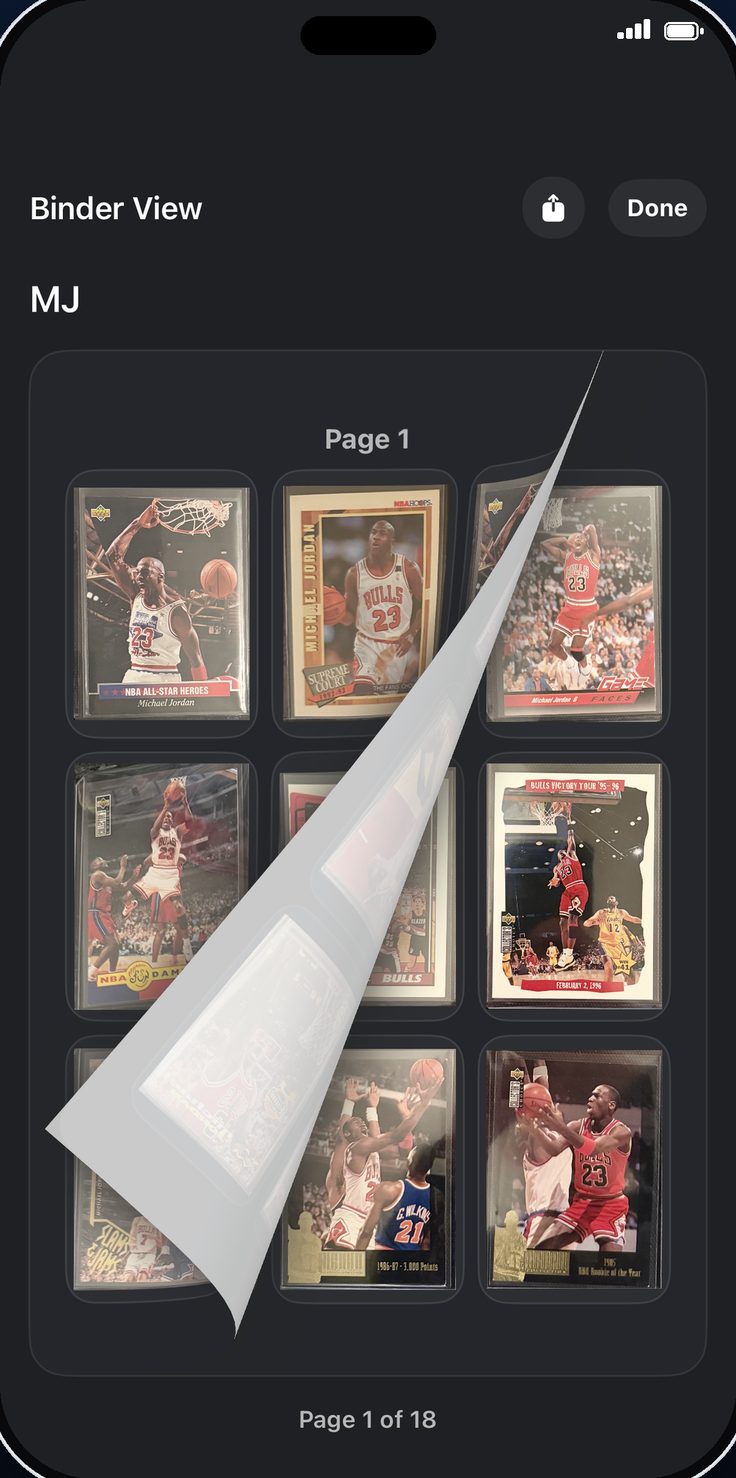
Organize cards into binders with a 3x3 pocket grid — just like a real binder. Drag to rearrange, flip to see backs, batch edit details, and browse in a page-turning Binder View.

iCloud Sync

Your entire collection syncs automatically across iPhone and iPad via iCloud. Only changed data transfers. Card images download on demand to keep storage efficient.

Share Binders

Export binders via AirDrop, Messages, or Mail. Friends open them in BinderIQ. Check a shared binder against your collection to see which cards you already own.

BinderIQ works with all sports trading cards — baseball cards, football cards, basketball cards, hockey cards, and soccer cards. Scan raw cards and graded slabs from PSA, BGS, SGC, and CGC. Whether you collect vintage Topps, modern Panini Prizm, Bowman Chrome, Donruss Optic, or Upper Deck, BinderIQ keeps your entire collection organized, searchable, and synced across all your devices.

How BinderIQ works: scan, organize, and track your cards

Scan your collection once. Then check if you own any card, anytime, with a single photo.

1

Scan your cards

Point your camera at one or more cards. The ML model detects each one, auto-crops with perspective correction, and reads the text with OCR to fill in all the details.

2

Organize into binders

Create binders by sport, set, or any category. Cards fill a 3x3 pocket grid — just like a real binder. Drag to rearrange, batch edit details, and flip to see backs.

3

Research & track

Look up PSA and Beckett grades, check eBay prices, detect duplicates at card shows, and track your collection's value — all from one app.

The card show companion: check your collection from your phone

You don't need to carry your card collection to a show anymore. BinderIQ puts your entire collection in your pocket — and tells you if you already own a card before you buy it.

Snap a photo, check your collection See a card you like? Take a photo and BinderIQ instantly tells you if it's already in your collection. No scrolling, no guessing.
Check eBay prices on the spot Snap a photo to find live listings and sold comps. Know what a card is worth before you make an offer.
Scan new pickups right there Buy a card? Scan it into your binder on the spot. The ML model detects, crops, and OCR fills in the details automatically.
Share binders with trade partners Export a binder to show what you have. Your trade partner can check it against their own collection to find matches.
What BinderIQ replaces
🗃
Shoeboxes & binders
No search, no tracking
📊
Spreadsheets
No photos, no scanning
BinderIQ
Scan, organize, research — one app

Frequently asked questions about BinderIQ

Is BinderIQ free?

BinderIQ includes a 7-day free trial with every feature unlocked. No credit card required to start. After the trial, it's $0.99/month with Family Sharing included.

What devices does BinderIQ support?

BinderIQ runs on iPhone and iPad with iOS 17 or later. Your collection syncs automatically across all your devices via iCloud.

What types of cards does it support?

BinderIQ works with all sports trading cards — baseball, football, basketball, hockey, and soccer. It supports cards from every major manufacturer including Topps, Panini, Upper Deck, Bowman, Donruss, and Fleer. The ML scanner detects both raw cards and graded slabs from PSA, BGS, SGC, and CGC.

Does it require an internet connection?

Most features work offline — scanning, organizing, OCR, and duplicate detection all run on-device. PSA/Beckett lookups and eBay price checks require an internet connection.

How does the card scanner work?

BinderIQ uses a custom YOLO-based machine learning model trained specifically on trading cards. Point your camera at one or more cards — the app detects each card, auto-crops with perspective correction, and saves them into your binder. It distinguishes raw cards from graded slabs.

Is my data private?

Yes. BinderIQ has no third-party analytics and collects no personal data. All scanning and OCR runs on-device using Apple's Vision framework. Your collection syncs via your private iCloud account — we never see your data.

Does it support graded cards (PSA, BGS)?

Yes. BinderIQ can look up PSA and Beckett/BGS grades by certificate number. It auto-scans graded slabs to find the cert number — no manual entry needed. Returns grade, population data, and sub-grades for BGS.

Can I share my collection with friends?

Yes. Export any binder as a shareable file via AirDrop, Messages, Mail, or any share sheet destination. Friends can open it in BinderIQ. You control whether to include back images, notes, and financial data.

Is BinderIQ the best sports card collection app?

BinderIQ combines features that other apps split across multiple products — ML-powered card scanning, OCR text recognition, duplicate detection, PSA and Beckett grade lookups, eBay price checks, and iCloud sync. It's built specifically for serious collectors who want one app to scan, organize, and research their entire collection.

Can I check card values and prices in BinderIQ?

Yes. BinderIQ includes eBay Card Lookup — snap a photo or search by card details to see live listings, recently sold prices, and direct links. After a PSA or Beckett lookup, the app automatically searches for comparable sales using the card's name, year, set, and grade.

How do I check if I already own a trading card?

Open the Check Collection tab and take a photo of any card. BinderIQ uses visual fingerprinting to match it against every card in your collection. Results show match percentage, confidence level, and a link to the matching card in your binder. Works at card shows, trade meetups, or anywhere.

What sports cards work with BinderIQ?

BinderIQ works with all sports trading cards — baseball, football, basketball, hockey, and soccer. It supports cards from every major manufacturer including Topps, Panini, Upper Deck, Bowman, Donruss, and Fleer. The ML scanner detects both raw cards and graded slabs from PSA, BGS, SGC, and CGC.

Download BinderIQ — free for iPhone and iPad

Your entire card collection in your pocket. Check if you own it, scan new pickups, look up grades and prices — all from one app.

Requires iOS 17+ · iPhone & iPad · No account required